

ref. v 9.3.3
https://www.npmjs.com/package/pg-promise
http://vitaly-t.github.io/pg-promise/
https://github.com/vitaly-t/pg-promise/wiki
기본 사용법 + 쓸 거 같은 기능 정리 + 예시
init
const pgp = require('pg-promise')({
  promiseLib: promise
  // Overrides the default (ES6 Promise) promise library for its internal use.
);

// Database connection details
// more details : https://github.com/vitaly-t/pg-promise/wiki/Connection-Syntax
const cn = {
  host: 'localhost',
  port: 5432,
  database: 'products',
  user: 'user-name',
  password: 'user-password'
};

const db = pgp(cn);
// const db = pgp('postgres://john:pass123@localhost:5432/products'
Database function for running query
http://vitaly-t.github.io/pg-promise/Database.html
any
0 이상의 결과(row)를 반환하는 쿼리
db.any('SELECT * FROM users')
  .then(function(data){
    console.log('>>>>', data);
    //[ { name : "aaa", email : "aaa@email.address" },
    //  { name : "bbb", email : "bbb@email.address" }, ... ]
  })
  .catch(function(e){
    console.log('>>>>', e);
  });
each
any의 결과로 얻은 각 row에 대해 함수를 실행 → (rows). forEach()
let index = 1;
db.each('SELECT * FROM users', [], row => {
  row.name = row.name + index++;
 })
 .then(data => {
   console.log(data);
   // [{ name : "aaa1", ... }, { name : "bbb2", ... }, ... ]
 })
 .catch(error => {
   console.log(error);
 });
func
SELECT * FROM funcName(values)
// function defined in postgresql
create or replace function foo()
returns Date as $cur$
  begin
    return now();
  end;
$cur$ language plpgsql;

// node
db.func('foo', [])
  .then(data => {
    console.log(data);
    // [ { "foo": "2019-10-03T15:00:00.000Z" } ]
  })
  .catch(error => {
    console.log(error);
  })
map
Creates a new array with the results of calling a provided function on every element in ther array of rows resolved by method any.라고 명시되어 then의 parm이 map 내부 return 값들의 배열이 되기를 기대하였으나, any의 결과를 return 한다.
api 문서와 다른 예시를 보았을 때 단독 사용보다는 task/tx와 함께 사용되는 것 같다.
http://vitaly-t.github.io/pg-promise/Database.html#map/ https://codeday.me/ko/qa/20190406/259937.html
db.each('SELECT * FROM users', [], row => return row.name )
  .then(data => {
    console.log(data);
    // expect
    //    [ "aaa", "bbb", ... ]
    // result
    //    [ { name : "aaa", email : "aaa@email.address" },
    //      { name : "bbb", email : "bbb@email.address" }, ... ]
  })
  .catch(error => {
    console.log(error);
  });
multi
return data를 가지도 별다른 행위를 하지 않는 복수의 쿼리를 실행하며, 쿼리들의 수행 결과들의 배열을 반환한다. BEGIN/COMMIT를 사용하지 않는 이상 쿼리들은 단일 트랜젝션으로 수행된다.
db.multi('SELECT * FROM users;SELECT * FROM class')
  .then(([users, class]) => {
    console.log('>>>>> users');
    console.log(users);
    console.log('>>>>> class');
    console.log(class);
    // >>>>> users
    // [ { name : "aaa", email : "aaa@email.address" },
    //   { name : "bbb", email : "bbb@email.address" }, ... ]
    // >>>>> class
    // [ { name : "c1", room : "1" },
    //   { name : "c2", room : "2" }, ... ]
  })
  .catch(error => {
    // error
  });
none
return 되는 데이터가 존재하지 않는 쿼리. return이 존재한다면 reject 된다.
db.none("UPDATE users SET last_locations=$1 WHERE email=$2", [value, email])
  .then(function(){
    console.log('>>>> success');
  })
  .catch(function(e){
    console.log('>>>>', e);
  });
one
단 하나의 row를 return 하는 쿼리. return이 0 또는 2 이상이면 reject 된다.
db.one('SELECT count(*) FROM Users', [], c => c.count)
  .then(count => {
    console.log(count); // integer
   });
query
query(query, values, qrm), qrm(Query Result Mask)의 입력값 형태의 리턴을 가지는 쿼리를 실행.
db.query('SELECT name FROM Users where name=\'xxx\'', [], pgp.queryResult.one + pgp.queryResult.none)
  .then(data => {
    console.log(data)
  })
  .catch(error => {
    console.log(error)
  });
result
return data에 대한 어떠한 기댓값이 없는 쿼리. 성공 시 Result를 결과값으로 가진다.
db.result('DELETE FROM users WHERE name=\'kkk\'')
  .then(data => {
    console.log(data);
  });
// Result {
//   command: 'DELETE',
//   rowCount: 1,
//   oid: null,
//   rows: [],
//   fields: [],
//   _parsers: [],
//   _types:
//   TypeOverrides {
//     _types:
//     { getTypeParser: [Function: getTypeParser],
//       setTypeParser: [Function: setTypeParser],
//       arrayParser: [Object],
//       builtins: [Object] },
//     text: {},
//     binary: {} },
//   RowCtor: null,
//   rowAsArray: false,
//   duration: 5 }
task
Executes a callback function with automatically managed connection.
db.task(t => {
    return t.map('SELECT email FROM congress_participants WHERE congress_id=\'C1\' and role = \'visitor\'', [], row => row.email)
            .then(rows => {
              let str =  '(\'' + rows.join('\', \'') + '\')';
              return t.any('SELECT * from users where email IN ' + str)
            });
  })
  .then(data => {
      console.log(data);
  })
  .catch(error => {
    console.log(error);
  })
tx
Executes a callback function as a transaction, with automatically managed connection.
- it executes BEGIN just before invoking the callback function
- it executes COMMIT, if the callback didn’t throw any error or return a rejected promise
- it executes ROLLBACK, if the callback did throw an error or return a rejected promise
db.tx(t => {
  return t.one('INSERT INTO users(email, name) VALUES($1, $2) RETURNING email', ['nnn@email.address', 'nnn'])
          .then(email => {
            return t.
          })

        return t.one('INSERT INTO Users(name, age) VALUES($1, $2) RETURNING id', ['Mike', 25])
            .then(user => {
                return t.none('INSERT INTO congress_participants(email, congress_id, role) VALUES($1, $2, $3)', [user.eamil, 'C1', 'visitor'])
            });
    })
    .then(function(){
      console.log('>>>> success');
    })
    .catch(function(e){
      console.log('>>>>', e);
    });
QueryResultError
함수가 reject 될 시 발생하는 에러. api 문서에서 각 함수의 하단부에 어떤 값으로 리턴될지 명시되어 있다.
http://vitaly-t.github.io/pg-promise/errors.QueryResultError.html
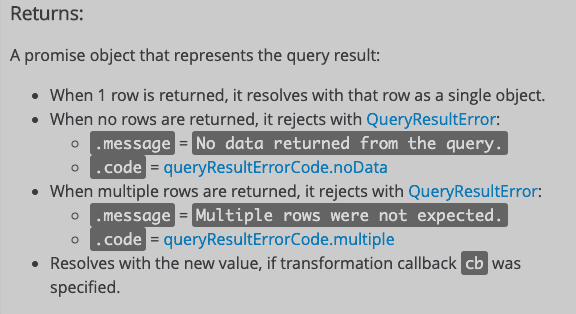
db.one('SELECT name FROM Users where name=\'xxx\'', [], c => +c.count)
  .then(count => {})
  .catch(error => { console.log(error); });

// QueryResultError {
//    code: queryResultErrorCode.noData
//    message: "No data returned from the query."
//    received: 0
//    query: "SELECT name FROM Users where name='xxx'"
// }
return 되는 row에 따른 함수 정리
| function | expects number of rows(n) |
|---|---|
| any(=manyOrNone) | 0 or more |
| none | 0 |
| one | 1 |
| oneOrNone | 1 or null(none) |
| many | 1 or more |
Helpers
update
update(data, columns, table, options), 하나 혹은 배열 객체에 대한 UPDATE 쿼리를 생성한다.
const data_single = { email: 'aaa@email.address', last_location: 'S1'};
pgp.helpers.update(data_single, ['last_location'], 'users') + ' WHERE email = ' + data_single.email;
// UPDATE 'data_single' SET 'last_location' = 'S1' WHERE email = 'aaa@email.address'

const data_multi = [{ email: 'aaa@email.address', last_location: 'S1'},
			        { email: 'bbb@email.address', last_location: 'S2'}]
pgp.helpers.update(data, ['?email', 'last_location'], 'users') + ' WHERE v.email = t.email';
// UPDATE 'data_multi' AS t SET 'last_location' = v.'last_location'
//   FROM (VALUES('aaa@email.address','S1'),('bbb@email.address','S2'))
//   AS v('email', 'last_location')
//   WHERE v.email = t.email
values
values(data, columns), 쿼리에서 사용할 수 있는 쉼표로 구분된 문자열을 생성한다.
const dataSingle = {val: 123, msg: 'hello'};
const dataMulti = [{val: 123, msg: 'hello'}, {val: 456, msg: 'world!'}];

pgp.helpers.values(dataSingle);
//(123,'hello')

pgp.helpers.values(dataMulti, ['val', 'msg']);
//(123,'hello'),(456,'world!')